An employee asks the bot in Telegram about a regulation or instruction and gets an answer found inside the company’s documents, together with a link to the full document. 60 people use it. Before, you had to remember which exact document held the instruction. Now you just ask a question.
Project at a glance
- Client: an education company, the same one as in the case about the voice AI agent.
- Users: 60 employees.
- Launch: August 2026.
- Systems: n8n, Telegram, Google Drive, Postgres (pgvector), OpenAI API, Cohere, Google Sheets.
The task
The company needed quick access to all documents in a convenient channel. Documents live in Google Drive folders: each folder is named after a department, with the files inside. To find an instruction, an employee had to remember where exactly it was. Departments also see different things, so access had to depend on the department.
What we built
The solution consists of three n8n workflows.
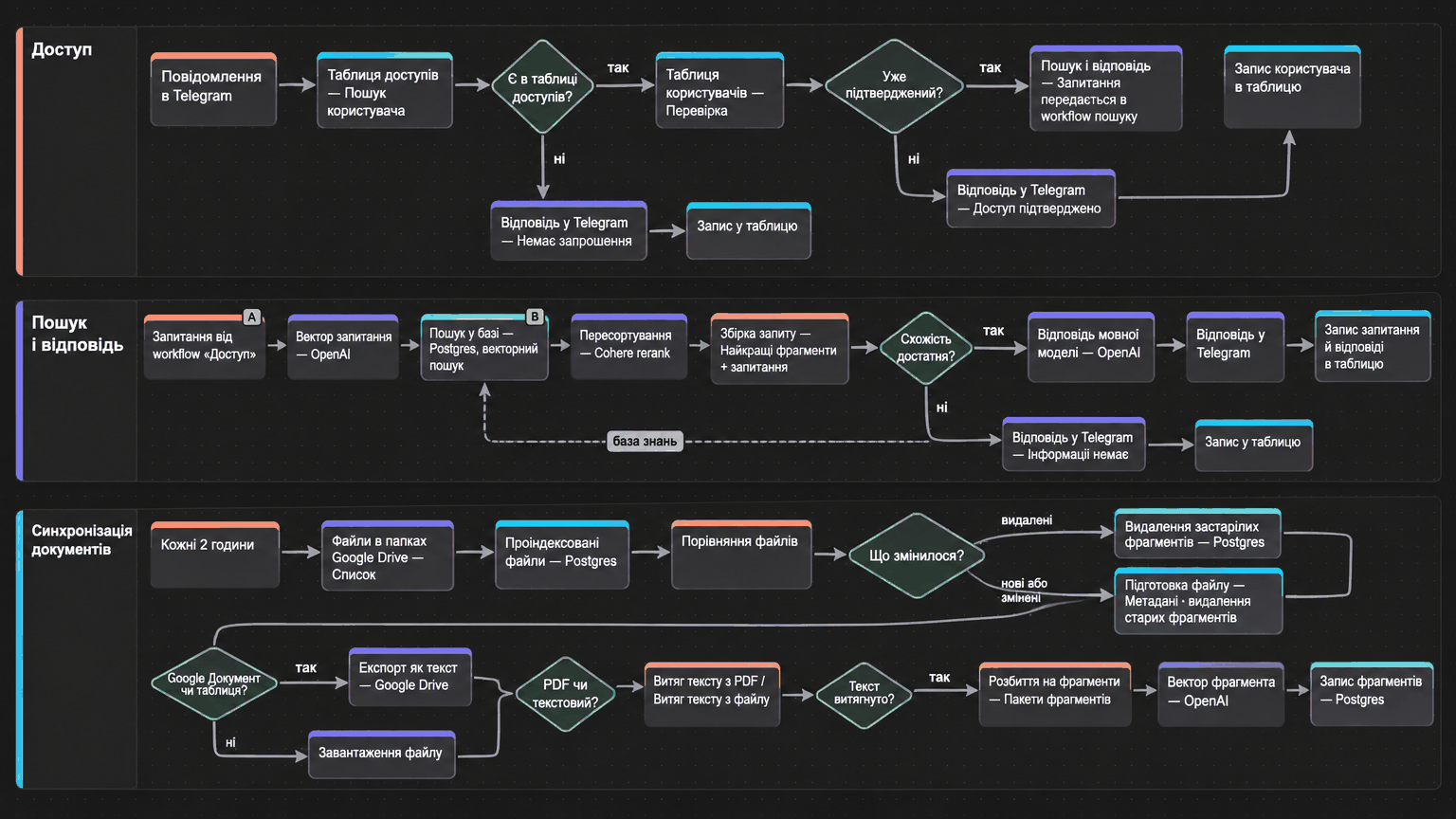
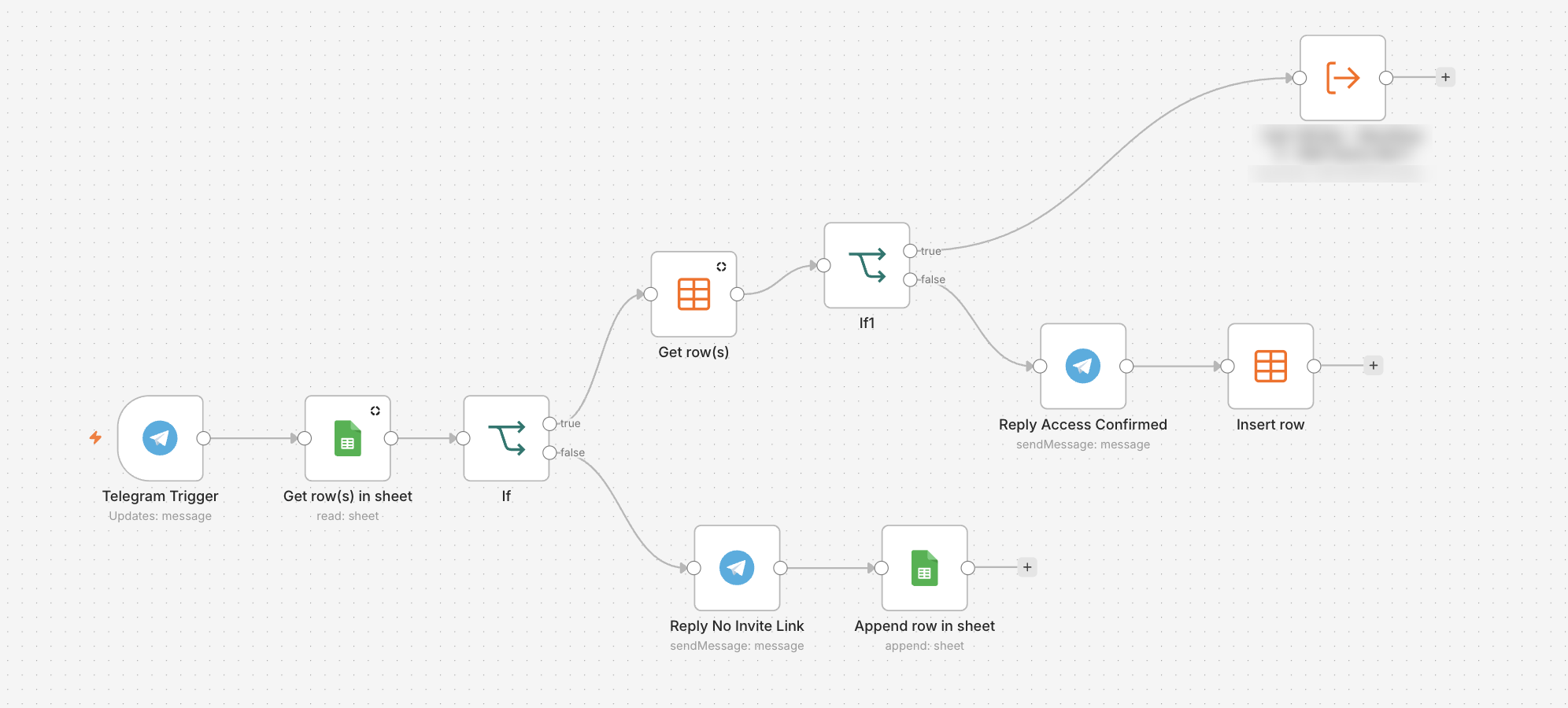
- Access (10 nodes). The bot asks for a personal code in a message; this is the user’s Telegram ID. HR adds it to an access table, and after that the person can use the bot. An unknown user does not reach the knowledge base; for a confirmed employee the bot replies and passes the question to the search workflow.
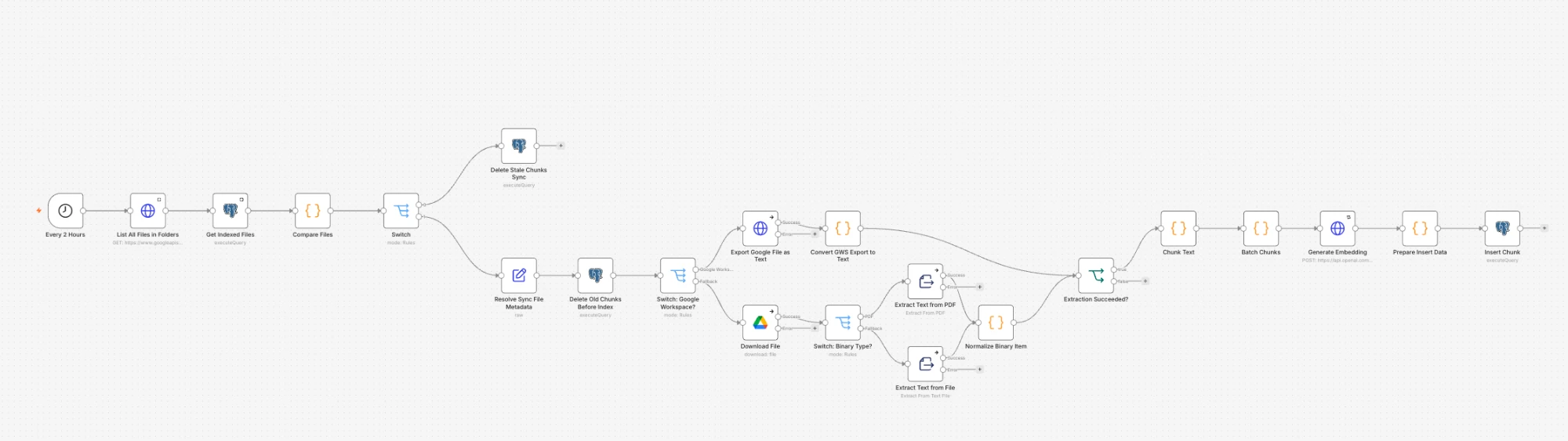
- Document sync (22 nodes). Every 2 hours the workflow compares files in the Google Drive folders with what is already indexed in Postgres. Deleted files are removed from the index; changed and new ones are re-read: Google Docs and Sheets are exported as text, while PDFs and text files are parsed separately. The text is split into chunks, a vector is computed for each, and the chunks go into the database.
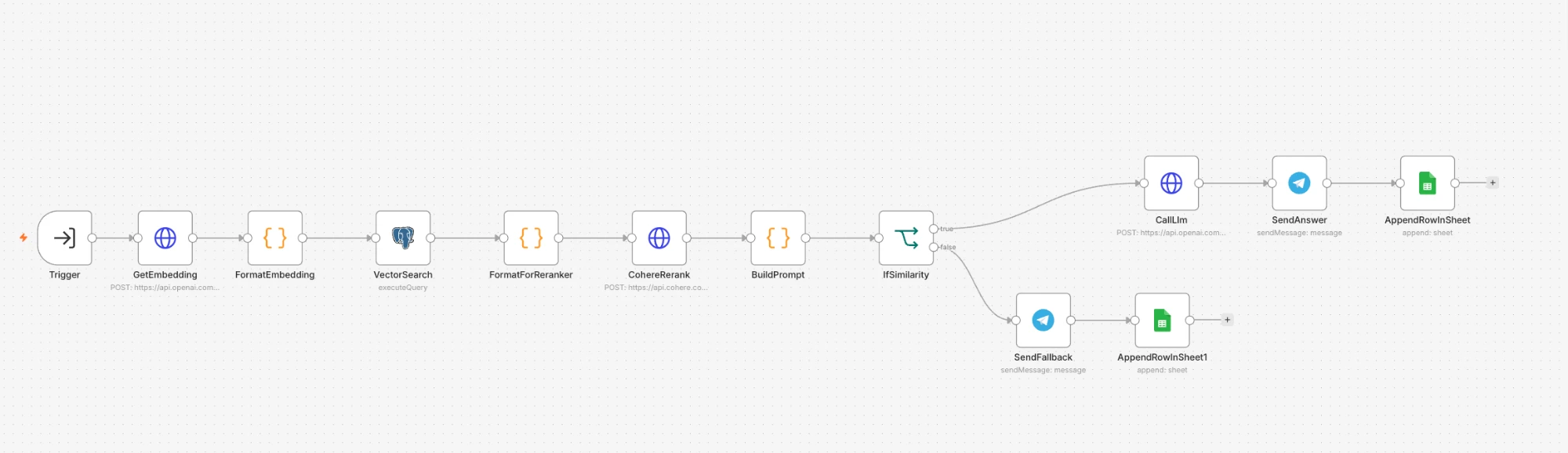
- Search and answer (13 nodes). The question becomes a vector, the search runs over the database, Cohere reranks the result, and a request to a language model is assembled from the best chunks. If similarity to the documents is too low, the bot does not invent an answer but honestly says that it has no such information or does not want to mislead, and advises asking a manager. Each question is written to a sheet: user identifiers, the question, a similarity score and the answer. The search works not by file names but inside the documents, and the answer includes a link to the full document.
Numbers
| Metric | Value |
|---|---|
| Users | 60 employees |
| Document folders | 10 |
| Index refresh | every 2 hours |
| Workflows | 3 (10, 22 and 13 nodes) |
We do not publish other numbers (number of questions, documents, share of unanswered questions). There is also no feedback from the client (how much time was saved, how many fewer questions go to HR), so we do not claim that the bot saved a particular number of hours.
What was hard
The hardest part was not technical but about the documents themselves. The client first uploaded everything it had: there was outdated data and files in formats that are hard to parse, in other words chaos in its own documents. The bot cannot give a precise answer from an outdated document, so most of the work was about the quality of the knowledge base.
The question log became a tool for putting things in order: we reviewed the unanswered questions and passed them to department heads, who corrected their documents. A separate technical part: keeping the index current when files change and get deleted, and handling different formats (Google Docs, PDF, text files).
What we would do differently, and limitations
We would add one more step before the search: a separate prompt that rewrites any user question into a clearer query for the knowledge base. People phrase questions differently, and that affects whether the search finds the right chunk.
Limitations: answers depend on the completeness and freshness of the documents, the index refreshes once every 2 hours, and unanswered questions need someone to extend the knowledge base. We have no measurements of answer quality.
Workflow diagram
Telegram → access check → question → vector → search in Postgres → Cohere rerank → answer with a link to the document. Separately: Google Drive → every 2 hours → file parsing → chunks and vectors → index.
Who it is for
For companies with a lot of documents where finding the right one is hard: regulations, instructions, onboarding of new employees. According to our public pricing, an HR RAG bot with a knowledge base and document search costs roughly $1,200–2,160 and takes 1–3 weeks; the vector database, servers and third-party APIs are paid separately. These are guidelines, not an offer. More about our AI solutions. Overview: AI integration for business.
FAQ
How much does an AI document assistant cost?
Public guideline from our pricing page: $1,200–2,160, 1–3 weeks. It depends on the volume of documents, the number of sources and security requirements.
Will an employee see another department’s documents?
No. Access is determined by the employee’s department at the search-query level. For example, a sales manager will not get an answer from the hiring department’s documents.
How quickly does the bot learn about changes in the documents?
The system checks Google Drive every 2 hours.
Can the bot make mistakes?
If the bot is not sure, it says so directly: that it does not have the needed information or does not want to mislead, and advises asking a manager. Weak matches are filtered out, and the answer includes a link to the original so the person can check the source.
What if our documents are a mess?
This is a typical situation: in this project the client first uploaded everything, including outdated files. The log of unanswered questions shows what needs fixing, and departments correct their own documents.