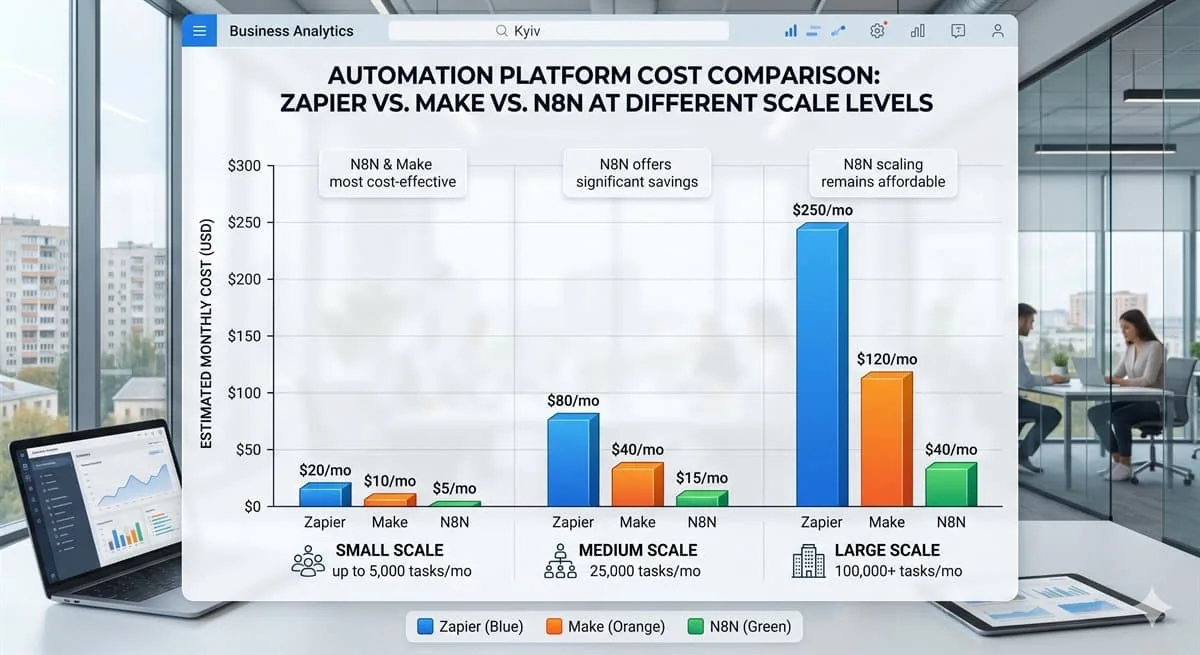
Choosing an automation platform in 2026 means picking between three dominant players — each with its own audience, strengths, and limitations. Make, Zapier, and N8N all promise to connect your tools and eliminate manual work, but they serve very different needs. This comparison cuts through the noise so you can make the right call for your business.

Zapier: Simplicity as the Core Value Proposition
Zapier is the most recognized name in no-code automation. With 7,000+ integrations and a beginner-friendly interface, you can launch your first workflow in under 15 minutes — no technical background required. It is the right fit for small teams needing to automate simple, linear processes quickly.
The tradeoff is cost. Zapier scales aggressively in price: 2,000 tasks per month runs $49, and multi-step conditional workflows require premium plans. For teams running serious automation volume, monthly bills can reach $500-$1,000. Simple entry, expensive exit.
Make (Integromat): Power for Complex Scenarios
Make is built for teams that need flexibility. The platform handles complex, branching workflows with data transformation, conditional logic, iterators, and aggregators — all in a visual editor that stays intuitive even for non-developers. Pricing is substantially cheaper than Zapier per operation.
Make offers a generous free tier, with paid plans starting at $9. For most B2B automation needs, this is the best price-to-capability ratio on the market. The caveat: Make has a steeper learning curve than Zapier, particularly for non-technical users tackling advanced scenarios.
N8N: Open-Source and Full Data Ownership
N8N is the only open-source option among the three. Self-host it on your own infrastructure and maintain complete control over your data — a non-negotiable requirement for companies operating under GDPR, HIPAA, or strict corporate security policies. A managed cloud version is also available.
N8N supports JavaScript execution directly inside nodes, enabling unlimited custom logic where native connectors fall short. The drawback: self-hosted deployment requires a DevOps resource or technical team for maintenance. But for companies prioritizing data sovereignty and unlimited scaling, N8N has no equal.
Comparison Table
| Parameter | Zapier | Make | N8N |
|---|---|---|---|
| Setup complexity | Very easy | Moderate | Technical |
| Free plan | 100 tasks/month | 1,000 ops/month | Self-hosted free |
| Cost at scale | High ($200-500/mo) | Moderate ($20-50/mo) | Low (server cost) |
| Integration count | 7,000+ | 1,500+ | 400+ (extensible) |
| Custom logic | Limited | JavaScript in filters | Full JavaScript |
| Self-hosted option | No | No | Yes |
| Best for | Non-technical teams | B2B mid-complexity | Technical teams / GDPR |
How to Choose — Decision Algorithm

Choose Zapier if:
- Your team has no technical staff
- You need a fast launch (1-2 days)
- Volume stays under 2,000 tasks/month
- Platform budget is not a critical factor
Choose Make if:
- You need complex, branching scenarios
- Volume ranges from 5,000 to 100,000 ops/month
- Your team has 1-2 people willing to learn
- You want the best price-to-capability ratio
Choose N8N if:
- Data must stay in your infrastructure (GDPR, corporate security)
- Execution volumes are very high (10,000+/day)
- You have a DevOps resource or plan to hire one
- You need custom integrations with internal APIs
Before deciding, run ROI numbers for your specific case. A $200/month difference can pay back in a week or never pay back at all — it depends entirely on which processes you automate.
Conclusion
There is no universally correct answer to the platform question. The right choice depends on your team size, technical capacity, data requirements, and budget. When in doubt, start with a free pilot on Make or N8N.
Want a professional assessment for your specific case? Book a free consultation — we will help you pick the right platform and estimate implementation effort. Or see real N8N case studies: webhook-based account management system, AI task manager with Gemini, banking API integration.